|
VirtueMart 2 and 3 |

| Express Checkout | PayPal Payments Pro | Authorize.Net SIM | WorldPay | Demos | Contact Us |
|
The download location for PayPal Payments Pro 3D Version 1.3.45 31 August 2024 Fix for Virtuemart 4.2.18 template. PayPal Pro 3D Secure - (1.3.45) Any Problems then use the previous versions: PayPal Pro 3D Secure - (1.3.41) PayPal Pro 3D Secure - (1.3.40) Installation and Setup Instructions for the PayPal Payments Pro Plugin Step 1 Go to the Joomla Extension Manager and click on Upload Package File section. Click on browse and locate paypalpaymentspro.zip 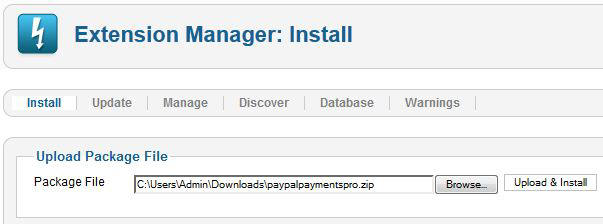
Step 2 This will take you to the plugin manager. Go to the plugin manager.. Tick the box PayPal Payments Pro - SSC and click the green enable button 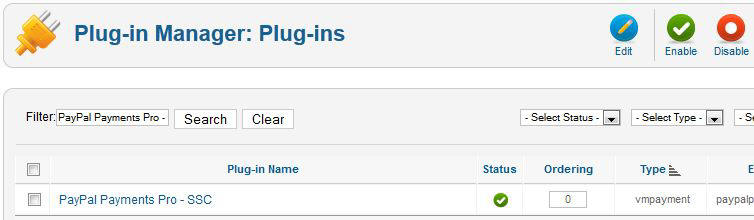 Step 3 Go to Virtuemart and click on Payment Methods. Click the New button. Enter the name that you wish to give the payment method in the Payment Name box. Remember this is the name that the customer will see. Select PayPal Payments Pro - SSC from the Payment Method drop down menu. Set Published to 'Yes'. 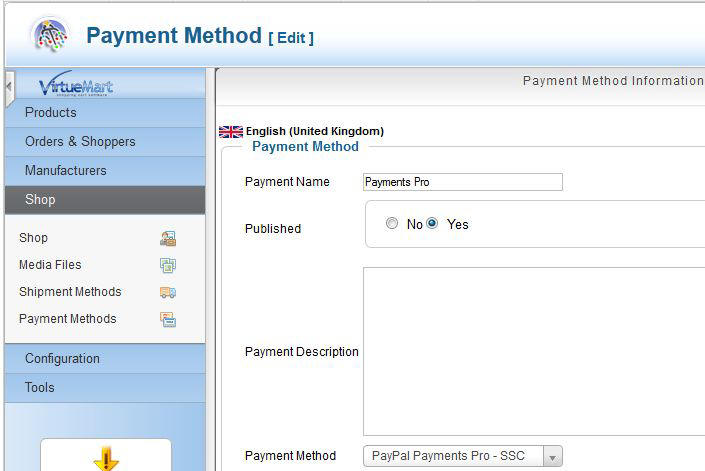 Step 4 Enter your PayPal API username, password and signature, then save. 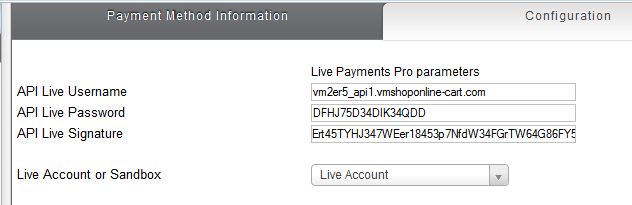 Finding your PayPal API details Log in to PayPal. Click on "My Account" then "Profile".  Look under the "My selling preferences" section Click update "API Access" 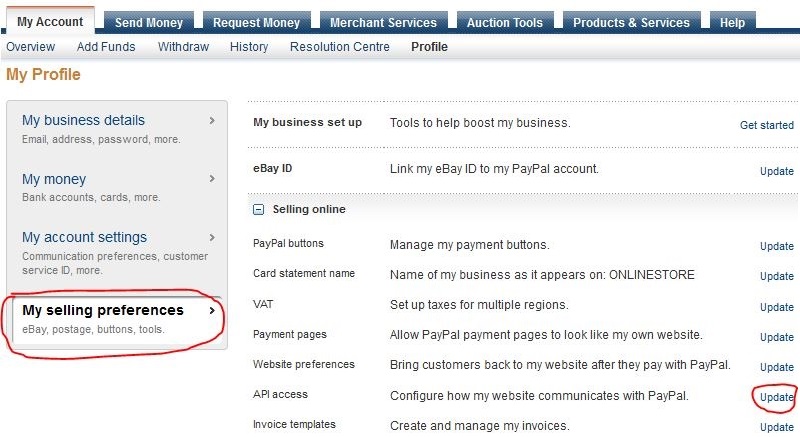 Select "Request API Credentials" 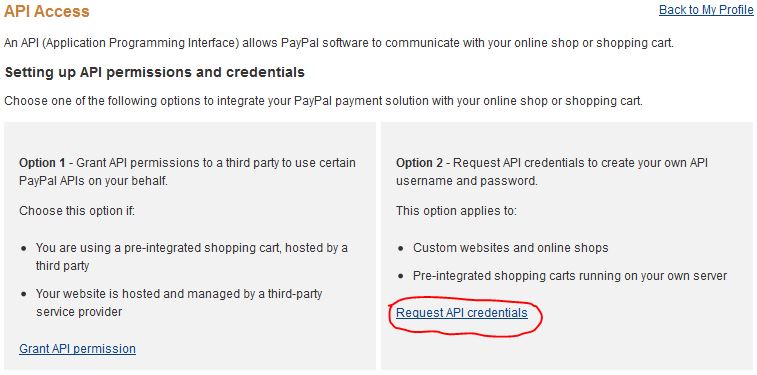 Select "Request an API Signature". 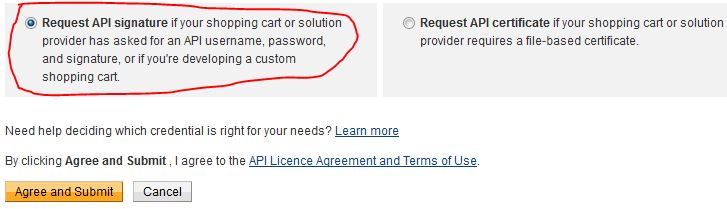 PayPal will then create and display an API Username, Password and Signature. You can then cut and paste these into the shopping cart setup program. Step 5 Published payment methods will have a green tick next to them in Payment Method section. 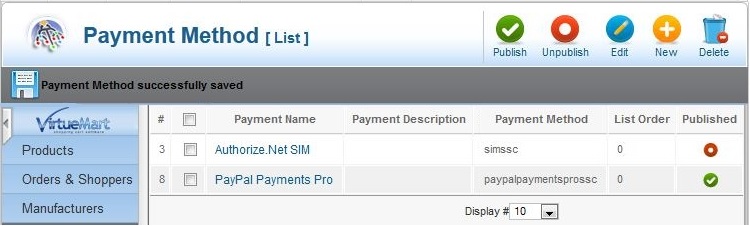 |
Change Log Version 1.3.45 31 August 2024 Fix for Virtuemart 4.2.18 template. Version 1.3.44 13 April 2023 Fix for Virtuemart 4.0.14 currency issues. Version 1.3.43 30 April 2022 Changes for Joomla 4 compatibility. Fixes plugin selection issue. Version 1.3.42 5 November 2021 Update for Joomla 4 compatibility. Version 1.3.41 5 November 2021 Fixes important issue for PHP 8 users which may produce an error with some setups. Version 1.3.40 11 May 2021 Update for PHP 7.4 to remove deprecated code. Version 1.3.39 2 September 2020 Important update to maintain SSL secure connections. Version 1.3.38 12 August 2020 More updates for Virtuemart 3.8 and above. Version 1.3.36 06 August 2020 Plugin Selection Fix for Virtuemart 3.8 and above. Version 1.3.35 09 July 2020 customer notes now display in the order confirmation page. Version 1.3.34 21 May 2020 update for Virtuemart 3.8.0 and above. Fixes selection issue with the native Virtuemart checkout. Version 1.3.32 4 March 2020 update for jquery conflict with native Virtuemart checkout. Third party checkouts were not effected. Version 1.3.31 6 February 2020 allows more control over the selection of available cards. Version 1.3.30 26 November 2019 Updates for VM 3.6.4 and above. Fix problem that prevented the payments from been selected. Version 1.3.24 Updates for 3D Secure Version 1.3.23 Update for PHP 7.2. Removes warnings when using Joomla Developer Mode. Version 1.3.22 Added support for PayPal Payflow plus Joomla update checking. Version 1.3.19 30 April 2018 Update for PHP 7.1 Version 1.3.18 23 February 2018 Version 1.3.17 18 October 2017 Version 1.3.15 - 27 May 2017 1.3.14 - 3 November 2016 Improvements to the checkout flow, plus extra checks to make sure only secure versions of Joomla are installed. 1.3.13 - 2 May 2016 Changes for PHP 7. Refinements to the jQuery checkout. 1.3.12 - 4 April 2016 PayPal Pro 3D Secure - (1.3.12) Automatically detects credit card type based on the credit card number. 1.3.11 - 4 February 2016 PayPal Pro 3D Secure - (1.3.11) Checks for out of date and insecure versions of Joomla. 1.3.10 - 16 November 2015 PayPal Pro 3D Secure - (1.3.10) Updates to Javascript for non-one page checkout mode. 1.3.9 - 11 November 2015 PayPal Pro 3D Secure - (1.3.9) Update for Virtuemart 3.10 compatibility. 1.3.8 - 3 August 2015 PayPal Pro 3D Secure - (1.3.8) Minor changes to layout 1.3.7 - 22 July 2015 Changes for one page check out compatibility. 1.3.3 - 08 December 2014 PayPal Pro 3D Secure - (1.3.3) Update for Virtuemart 3.0.2 order form. 1.3.2 - 11 November 2014 PayPal Pro 3D Secure - (1.3.2) Option to use less clicks to checkout. 1.3.1 - 22 October 2014 PayPal Pro 3D Secure - (1.3.1) Added a single installer for both VM2 and VM3. 1.0.14 - 30 June 2014 Added the option to show or hide the Show/Hide CSC field. Normally the default setting of show would be used. 1.0.13a - 29 May 2014 PayPal Pro 3D Secure (1.0.13a) Changes to the order form to allow better compatibility with some templates. |